Throw Start a circle, free

Run your Susu without the chasing.

Throw is a free app for the Susu, Pardner, Ajo or Tontine you already run. It keeps the dates, the payout order, the reminders and the receipts. Everyone pays from their own banking app, and Throw never holds the money.

Free while we test. Works in any phone browser, iPhone or Android.

Got an invite? Open the link you were sent.

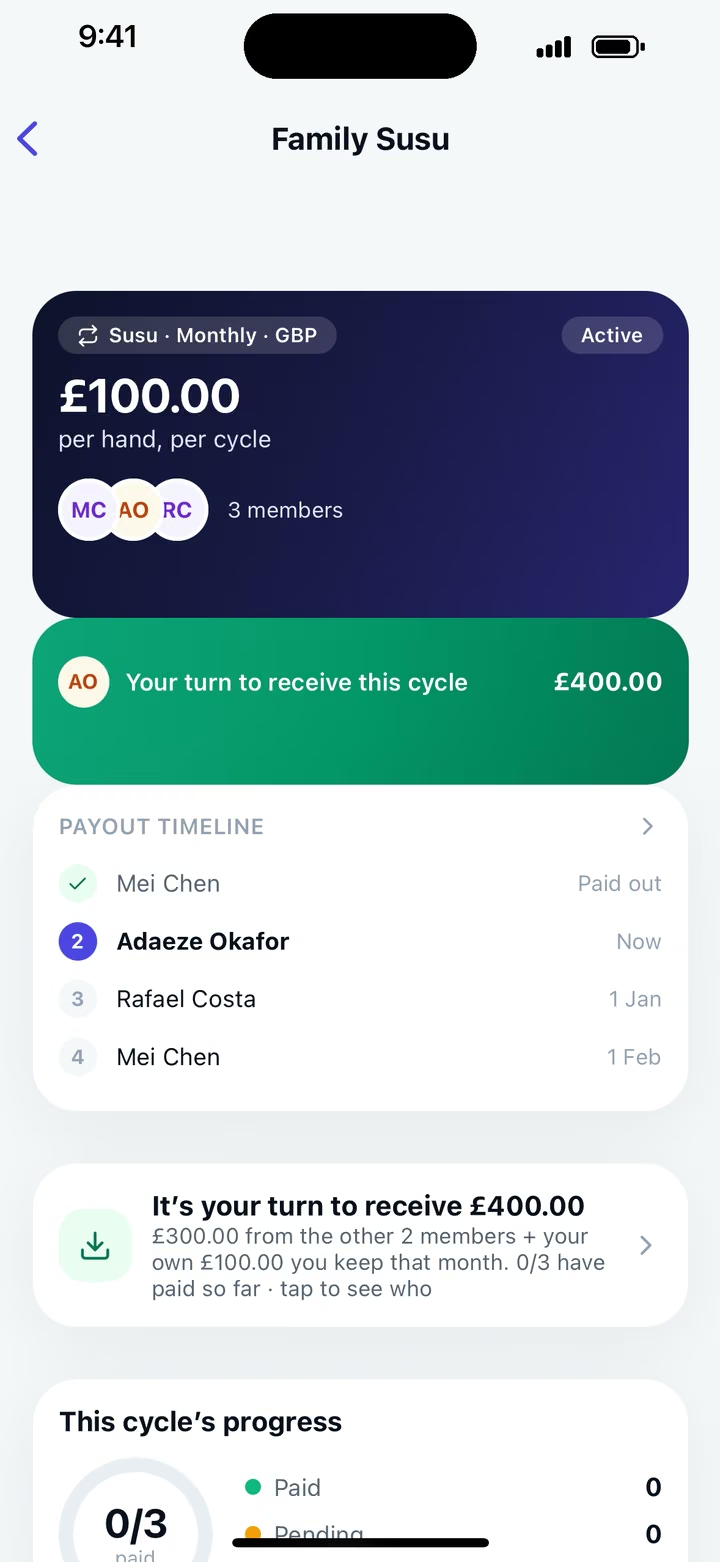
The Family Susu in Throw: £100 per member each month, four members, and a green banner saying it is your turn to receive £400. Below it, the payout timeline: Adaeze Okafor paid out, Mei Chen now, Rafael Costa on 17 February, Efua Asante on 17 March.

Set it up once. Then the pot goes round.

Throw does the parts that usually land on the organiser: working out the dates, keeping the order, reminding people and keeping count. Read the full guide to how Throw works.

  1. Set up your circle

    Give it a name and your word for it: Susu, Pardner, Ajo or your own. Choose the amount, how often everyone pays and how many places. Throw works out the pot and every payout date.

    Step 1 of 5 in Throw: Name your Susu. The name is Family Susu, and Susu is selected as what the community calls it, from options including Pardner, Ajo, Esusu, Tontine, Daret, Committee and ROSCA.

    Example circle: made-up names and amounts

  2. Invite on WhatsApp

    Share one link to your group chat. People open it in their phone’s browser, read the agreement and join. You can see who is in before you start.

    Your Susu is ready: the Family Susu invite, with an invite code, a preview of the invite message and a green Share on WhatsApp button.

    Example circle: made-up names and amounts

  3. Everyone pays from their own bank

    Throw shows each payer who to pay, with the name, sort code, account number and a reference to copy. They send it in their own banking app, then tap I’ve paid.

    The Throw home screen: next action, pay £100 to Mei Chen for the Family Susu, due 17 January, with a Pay this cycle button. Below, the circle card shows Mei Chen receiving £400 in cycle 2, with 2 of 3 paid.

    Example circle: made-up names and amounts

  4. The pot goes round

    The person receiving checks their account and taps Mark as received. Everyone sees whose turn it is, who has paid and what comes next, with reminders in the app before each date.

    Whose turn is it? The payout timeline: cycle 1, Adaeze Okafor, £400 received. Cycle 2, Mei Chen, receiving now, two of three paid. Then Rafael Costa and Efua Asante, with their dates.

    Example circle: made-up names and amounts

Call it what your family calls it.

A Susu, a Pardner, an Ajo, a Tontine, a Committee. Pick the word your group already uses, and Throw uses it everywhere: in the reminders, the receipts and the group room.

It’s Adaeze’s turn to receive the Susu on 1 December.

Something else at home? Type your own word when you set it up.

The Throw home screen: next action, pay £100 to Mei Chen for the Family Susu, due 17 January, with a Pay this cycle button. Below, the circle card shows Mei Chen receiving £400 in cycle 2, with 2 of 3 paid.

Example circle: made-up names and amounts

Made for the one who holds it together.

Most circles run on one person’s memory and a WhatsApp thread. Throw gives that person a clear record and gives everyone else a clear view.

For organisers

  • Set the payout order with the group, and change it until the circle starts.
  • See who has paid this cycle at a glance.
  • Reminders go out in the app before every due date, so you stop chasing.
  • Late payments, turn swaps and someone leaving each have a clear path, recorded for the whole group.
  • Free while we test, for you and everyone in your circle.

For members

  • Know your payout date from the day you join.
  • Pay from your own banking app. Throw shows the account details and a reference, with buttons to copy them.
  • Tap I’ve paid when you’ve sent it. The person receiving marks it as received.
  • A receipt for every payment, and the same record the organiser sees, so there’s nothing to argue about.

Your money never sits with us.

Throw keeps the record. You pay from your own banking app.

  • Throw never holds your money

    Each contribution goes from the payer’s bank account straight to the member receiving the pot. Throw never holds, moves or starts a payment.

  • You pay from your own banking app

    Throw shows you who to pay and the details to send to. You make the payment yourself, the same way you pay anyone. Throw can’t see your bank account.

  • One record everyone can see

    The payer taps I’ve paid, the person receiving taps Mark as received, and it goes in a ledger the whole group shares. Nobody keeps a private version.

  • Account changes are flagged

    If someone changes the account their pot is paid into, people paying them see a warning for the next 7 days.

Transparent record: the ledger lists every contribution, with who paid, the cycle, the amount of £100 and its status, either due or manually confirmed.

Example circle: made-up names and amounts

Free while we test.

No fee for anyone: not the organiser, not the members. No card, and nothing to pay to Throw.

Free While we test

£0for everyone in the circle

Everything Throw does today, for the organiser and every member.

  • Call it Susu, Pardner, Ajo or your own word
  • Invite by WhatsApp link or code
  • Payout order, schedule and due dates
  • Payee details and a reference to copy, then I’ve paid
  • Mark as received, with a receipt for every payment
  • A shared ledger and reminders in the app
  • A room for the circle’s messages
  • Turn swaps, and replacing someone who leaves
  • Report an issue if something goes wrong

Your money stays yours

Throw keeps the record. Everything else stays between you, your bank and your circle.

  • Members pay each other directly, from their own banking apps
  • Nothing is paid to Throw, and nothing comes out of the pot
  • No card details, and no bank login
  • Throw can’t see your bank account
  • Only the person paying you that cycle sees your account details
  • UK accounts in pounds. Up to 12 members and £250 per place

If that ever changes, you’ll hear first. A fee may come later. If it does, we’ll give notice, and it will only apply to new circles. What’s free, and what could change.

Questions people ask

Does Throw hold our money?

No. Every contribution goes from the payer’s own bank account straight to the member receiving the pot that cycle. Throw shows who to pay and keeps the record. It never holds, moves or starts a payment.

Is my money safe?

Throw never touches it. You send each payment yourself, from your own banking app, to the account details shown in Throw. Throw can’t see your bank account.

A savings circle still runs on trust between its members. Throw doesn’t guarantee or insure payments, so join circles with people you know.

What if someone doesn’t pay?

Throw reminds them in the app before the due date. If a payment is late, it shows in the record the whole group can see. The grace period and what happens next are agreed at the start, before anyone joins.

Members can swap turns, or hand their place to someone new. Throw doesn’t cover missed payments.

What does it cost?

Nothing. Throw is free for everyone while we test it, organisers and members. If a fee comes later, we’ll give notice first, and it will only apply to new circles.

Which banks work?

Any UK bank account in pounds. You pay with your own banking app, the same way you pay anyone. Throw shows you the name, sort code, account number and reference to use, with buttons to copy them.

Does it work on iPhone and Android?

Yes. Throw works in the browser on any phone, at app.throw.club. Add it to your Home Screen and it opens like an app. There’s nothing to download.

How big can a circle be?

Up to 12 members, and up to £250 per place each time. Circles are invite-only, and everyone pays in pounds.

I was sent an invite. What do I do?

Open the link you were sent. It opens Throw in your phone’s browser and shows the circle’s amount, dates and agreement. If you’re happy with it, you join from there.

Run your circle on Throw

Throw is free while we test it. Set up your circle in a few minutes, invite everyone on WhatsApp, and let Throw keep the dates, the reminders and the record.

For organisers running a Susu, Pardner, Ajo or any savings circle Works in any phone browser, iPhone or Android No fee for anyone, and no card needed

Start a circle, free

Throw works in the browser on any phone, iPhone or Android. Set up your circle, then share the link on WhatsApp. To keep it on your phone, add it to your Home Screen and it opens like an app.

Start a circle, free

Got an invite? Open the link you were sent. It takes you straight to the circle.