How Throw works
A step-by-step guide to running a rotating savings circle on Throw, from the first invite to the last payout, and what happens when things don’t go to plan.
The four steps
Whatever your group calls it, a circle on Throw runs the same way.
-
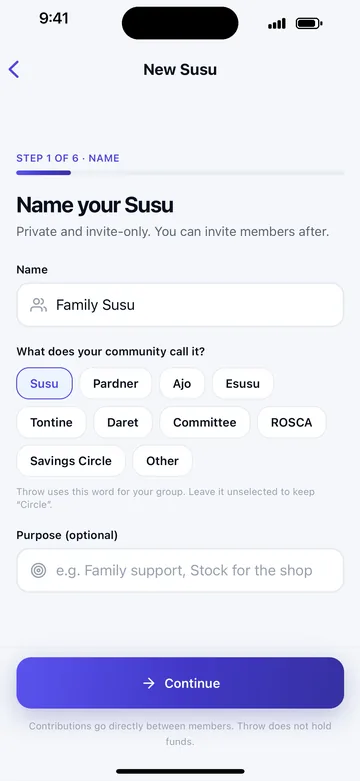
Set up your circle
Give it a name, choose the amount, how often everyone pays and how many hands. Throw works out the pot and every payout date.
-
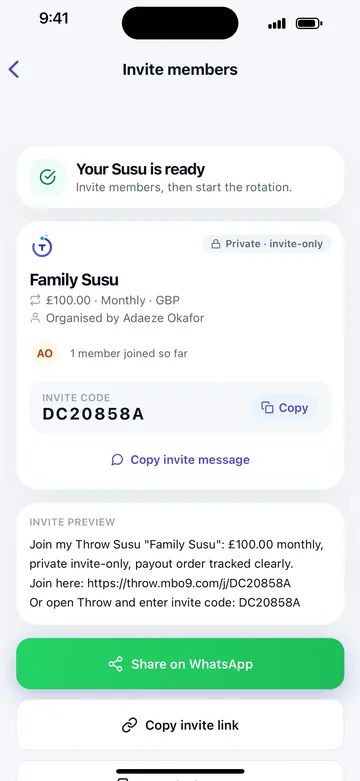
Invite on WhatsApp
Share one link to your group chat. People join with the invite code, and you can see who is in before you start.
-
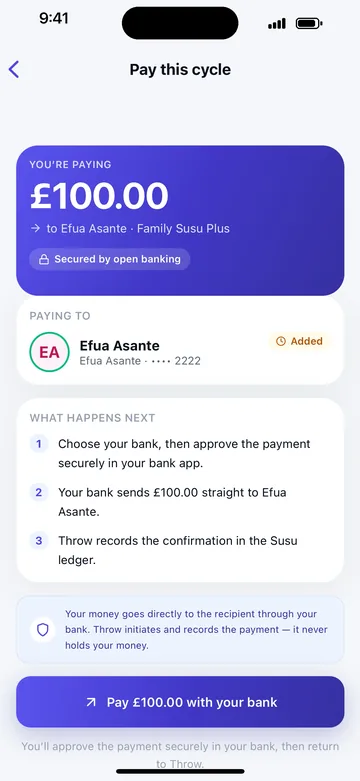
Everyone pays bank to bank
Each member approves their payment in their own banking app. It goes straight to whoever is receiving this time, and the record updates for everyone.
-
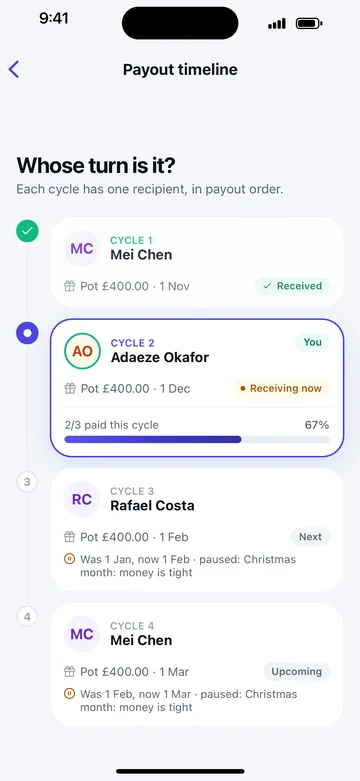
The pot goes round
Everyone can see whose turn it is, who has paid and what comes next. Reminders go out before each date, so you don’t have to send them.


The rules your group agrees
Everything below is set when the circle is created, so every member sees it before they join and accepts it when they do.
- Amount and rhythm
- How much each hand pays, and whether it’s weekly, fortnightly or monthly.
- Hands
- How many shares there are. Each hand receives the pot once. On Plus, one member can take more than one hand.
- Payout order
- Fixed by the organiser or drawn at random. The organiser can change it until the circle starts, and the change is recorded.
- Grace period
- How many days a payment can be late before it counts as late.
- If a payment is late
- Whether the organiser decides case by case or the cycle waits for the late payment.
- Swaps
- Whether members can swap turns, and who has to agree. On Plus, groups set their own swap rules.
How the money moves
Before the circle starts, each member adds the bank account their pot should be paid into. They can connect their bank so the account shows as verified to the group.
Each cycle, members pay from the Throw app. They choose their bank, approve the payment in their own banking app, and the bank sends it straight to the member receiving that cycle. Payments are started by Yapily Connect Ltd, which is authorised by the Financial Conduct Authority (FRN 827001). Throw itself is not FCA-regulated and never holds the money.
When a payment is confirmed, it appears in the ledger for everyone, with a receipt for the payer. On Throw Plus, Autopay can pay each contribution on its date, and payments can be confirmed automatically from the bank.
Throw’s own fee is paid once, at the start, the same way: from the member’s bank to Throw. See plans and pricing.

When things don’t go to plan
Someone is late
Members get a reminder before each due date. If a payment is late, the organiser is told, the grace period applies, and the member can ask for more time. Late payments and money owed are tracked in the record. Throw doesn’t cover missed payments.
Someone needs a different turn
Members can ask to swap turns. The swap only happens if the other member agrees, and the new order is recorded for everyone.
Someone has to leave
A member can leave and be replaced by someone new, who takes over their place in the order. What they still owe stays on the record.
Someone disagrees with a payment
Any member can raise a dispute about a payment. It’s recorded where the group can see it.
The group needs to decide something
Each circle has a group room for messages and decisions. On Throw Plus, binding group votes can pause a cycle or change a rule, and the change applies when the vote passes.
Watch it in action
Two short videos recorded in the real app.
For organisers
- Set the payout order once, and change it until the circle starts.
- See who has paid this cycle at a glance.
- Reminders go out before every due date, so you stop chasing.
- Late payments, swaps and someone leaving each have a clear path, recorded for the whole group.
- Organisers can run the group for free.
Watch an organiser set up a Susu, invite members and start it. Under 4 minutes.
For members
- Know your payout date from the day you join.
- Pay from your own bank. No card, and no account numbers to type.
- A receipt for every payment you make.
- The same record the organiser sees, so there’s nothing to argue about.
Watch a member join from an invite, pay and receive the pot. Under 4 minutes.
Questions people ask
Does every member need the app?
Yes. Each member joins and pays in the Throw app, which is on iPhone for now and in testing through TestFlight.
Does Throw hold our money?
No. Every contribution goes from the payer’s bank account straight to the member receiving the pot that cycle. Throw records the payment and shows its status. The only money paid to Throw is its own fee.
Is my money safe?
You approve each payment yourself, in your own banking app. Payments are started by Yapily Connect Ltd, which is authorised by the Financial Conduct Authority (FRN 827001). Throw never has access to your bank account.
A savings circle still runs on trust between its members. Throw doesn’t guarantee or insure contributions, so join circles with people you know.
Which banks work?
Most UK banks and building societies that support open banking payments. You choose your bank in Throw, then approve the payment in your banking app. For now, payments are in pounds from UK accounts.
Is Throw on Android?
Not yet. Throw is on iPhone first. It’s in testing through Apple’s TestFlight now, with the App Store release coming soon. Join the early access list and we’ll tell you when Android is ready.
Get early access
Throw is in testing on iPhone. Tell us about your group and we’ll be in touch as places open, and when Throw is on the App Store.
You’re on the list
We’ll email you as soon as there’s a place for your group.